Meal Planner KDP Interior: Formats & Usage Guide
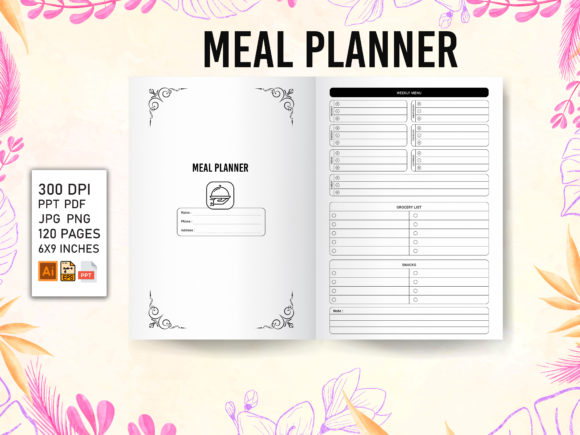
The health and wellness sector remains one of the most consistent performers in the self-publishing space, but success often depends on utility rather than just aesthetics. A Meal Planner KDP Interior serves as a functional framework for low-content books designed to help users organize nutrition, track macros, or manage family grocery lists. Unlike lined journals that require minimal thought, meal planners demand specific structural considerations like weekly grids, shopping list sections, and hydration trackers. For publishers and creators, having access to editable source files transforms this from a simple upload task into a scalable business asset.
Why Format Versatility Matters for Publishers
When evaluating digital assets for Amazon KDP, the file type is just as important as the design itself. Relying solely on a flattened PDF limits your ability to adapt to market trends or correct errors post-purchase. A comprehensive interior package that includes AI, PPT, EPS, PDF, PNG, and JPG files addresses different workflows and skill levels. This versatility ensures that whether you are a graphic designer comfortable with vector manipulation or a marketer who prefers drag-and-drop simplicity, the asset remains useful.
- Adobe Illustrator (AI) & EPS Files: These vector-based formats are essential for professionals who need to resize elements without losing quality or modify grid lines to fit custom trim sizes. They allow for deep customization of fonts, colors, and layout structures.
- PowerPoint (PPT) Files: Often overlooked in design circles, PPT interiors are invaluable for beginners and non-designers. They allow users to edit text, move tables, and adjust layouts using familiar software without learning complex vector tools.
- PDF Files: The industry standard for uploading. Having both an editable source and a print-ready PDF ensures you have a backup that is fully tested for Amazon’s printing specifications.
- PNG & JPG Files: High-resolution raster images serve multiple purposes beyond the book interior. They can be used for marketing mockups, social media promotion, or as standalone digital downloads for customers who prefer printable sheets over bound books.
Perspectives Across Different User Groups
The value of a structured meal planning template shifts depending on your experience level and end goal. Understanding these distinctions helps in selecting the right asset and maximizing its potential.
For Beginners and Side Hustlers
New entrants to the KDP space often face a steep learning curve regarding margins, bleed settings, and resolution requirements. For this group, the primary priority is reliability and speed. A pre-tested PDF file eliminates the anxiety of rejection during the upload process. Furthermore, the inclusion of 100 ready-to-upload pages provides immediate inventory. Beginners benefit most from the PowerPoint version, as it allows them to understand how the interior is constructed without needing expensive software subscriptions. The focus here is on getting a quality product listed quickly to validate the niche.
For Experienced Publishers and Agencies
Veterans in the low-content space prioritize scalability and brand differentiation. They rarely use templates "as is" because duplicate content can lead to visibility issues on Amazon. For these users, the AI and EPS files are the core deliverables. They provide the foundation for creating proprietary variations—changing header styles, adding unique branding elements, or combining meal planning with fitness tracking to create hybrid journals. The commercial value lies in the ability to rapidly produce distinct SKUs from a single master file while maintaining professional typographic standards.
For Educators and Nutrition Coaches
Professionals in health education view these interiors through the lens of client utility. A generic meal planner may not suit a specific dietary methodology like Keto, Vegan, or Intermittent Fasting. Access to editable vectors allows coaches to customize terminology, add specific macro-nutrient columns, or include educational tips relevant to their curriculum. Here, flexibility outweighs speed. The ability to export high-quality PNGs also enables these professionals to offer digital bonuses or worksheet supplements alongside their physical books, enhancing their service ecosystem.
Evaluating Quality Beyond the Cover
While covers drive clicks, interiors drive reviews and repeat purchases. When assessing a Meal Planner KDP Interior, look beyond the visual appeal and consider the user experience. A great niche for growing sales requires solving actual problems.
Functional Layout: Does the weekly spread offer enough writing space? Are the grocery lists categorized logically? Users abandon planners that feel restrictive or poorly organized. Ensure the template balances structure with freedom.
Print Optimization: Screen brightness differs from ink density. Interiors must be tested for grayscale printing. Lines should be thick enough to print clearly but light enough to write over. Margins must account for binding so that writing near the spine remains accessible.
Adaptability: Market preferences change. A template locked into a specific year or rigid diet plan has a shorter shelf life. Undated, flexible designs typically offer better long-term usefulness and return on investment.
Practical Applications and Workflow Integration
Integrating these files into your workflow depends on your technical setup. If you are building a brand around organization and wellness, consistency is key. Using the vector files, you can establish a signature style guide—specific line weights, font pairings, and icon sets—that carries across multiple products. This creates brand recognition in a crowded marketplace.
For those focusing on volume, the batch-processing capabilities of PDF and PPT files streamline production. You can create a master template and generate variations for different demographics, such as a simplified version for kids' lunch planning or a detailed version for bodybuilders. The availability of multiple formats means you never hit a technical bottleneck; if one software fails or updates incompatibly, you have alternatives ready.
Marketing efforts also benefit from the included image files. Creating realistic mockups usually requires purchasing separate assets or hiring designers. Having native PNG and JPG exports of the interior pages allows you to create accurate "Look Inside" previews and social media content immediately. This transparency builds trust with potential buyers who want to verify the layout before purchasing.
Determining Fit for Your Project
Not every publisher needs every format, and not every meal planner suits every audience. Before incorporating this asset, assess your current capabilities and objectives. If you lack vector editing skills and have no intention of learning, prioritize packages with robust PPT or editable PDF options. If you are entering a saturated sub-niche, ensure the template offers enough structural uniqueness to stand out, or plan to invest time in significant modification.
Consider the end-user's context. A meal planner for busy parents needs quick-reference sections and durability considerations, while a clinical nutrition journal requires precise data entry fields. Matching the interior complexity to the target audience's patience and need is what ultimately converts a download into a positive review. By leveraging the right combination of file types and understanding the specific needs of your segment, a Meal Planner KDP Interior becomes more than a template; it becomes a foundational tool for sustainable publishing growth.