Caregiver Log Book Interior: A Practical Guide for KDP Publishers
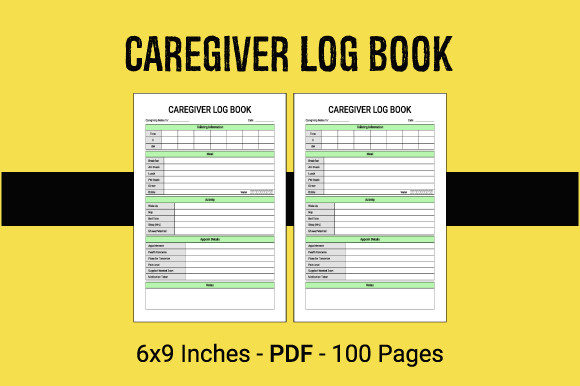
Creating a successful low-content book on Amazon KDP requires more than just uploading a generic template; it demands an understanding of the end user's specific needs. For publishers targeting the senior care and medical tracking niche, a well-structured Caregiver Log Book Interior is the foundation of a profitable product. This digital asset serves as the functional core of your publication, providing the necessary framework for families and professional aides to track medications, vital signs, meals, and daily activities. When you utilize a ready-to-use PDF file designed specifically for this purpose, you bridge the gap between a blank notebook and a valuable healthcare tool.
The appeal of these pre-formatted interiors lies in their efficiency and compliance with standard publishing requirements. However, many creators rush the selection process, assuming that any logbook template will suffice. This assumption often leads to poor reviews and low sales. To build a sustainable KDP business, you must evaluate these files with a critical eye, ensuring they meet both technical printing standards and practical usability requirements for caregivers who are often stressed or time-poor.
Understanding the Functional Value of Specialized Interiors
A Caregiver Log Book Interior is distinct from a general journal because it solves immediate organizational problems. People searching for these books are typically managing complex schedules for elderly relatives or patients with chronic conditions. They need clarity, not decoration. The 100-page format included in most high-quality digital files strikes a balance between portability and longevity. At 6″ x 9″ inches, the book is small enough to fit in a tote bag or glove compartment yet large enough to provide adequate writing space for detailed notes.
When evaluating a ready-to-use PDF, look beyond the aesthetic. The true value is in the layout logic. Does the medication tracker include columns for dosage, time, and administration method? Is there sufficient white space for handwriting, considering that many users may be older adults with varying levels of dexterity? A superior interior anticipates these friction points. If the lines are too faint or the boxes too cramped, the book becomes frustrating rather than helpful. Your goal is to offer a solution that feels intuitive from the first page to the last.
Common Technical Oversights in POD Publishing
One of the most frequent mistakes new publishers make involves misunderstanding bleed settings. The product specifications clearly state "No Bleed" for these 6″ x 9″ interiors. This is a crucial detail that affects how you design your cover and format your final upload. No bleed means all content must stay within a safe margin, typically 0.25 inches from the trim edge. If you attempt to stretch background elements or borders to the edge of the page using a no-bleed interior file, Amazon’s automated review system will reject your manuscript, or worse, print it with unintended white borders that look unprofessional.
Another technical pitfall involves resolution mismatches. While the description specifies high-resolution PDF files, some creators inadvertently compress these files during the upload process or combine them with low-quality cover art. Always verify the DPI (dots per inch) of your downloaded interior before publishing. Standard KDP requirements call for at least 300 DPI for crisp text and lines. Blurry tables or pixelated checkboxes signal low quality to potential buyers browsing the "Look Inside" feature. Never assume a file is print-ready simply because it was sold as such; always perform a visual inspection at 100% zoom.
Evaluating Usability Before You Publish
Beyond technical specs, the content relevance determines market success. A common error is selecting a Caregiver Log Book Interior based solely on page count rather than feature set. A 100-page book filled with repetitive, irrelevant fields provides less value than a shorter book with comprehensive tracking sections. Before committing to a specific PDF, audit the interior pages against real-world caregiving scenarios.
- Versatility of Tracking Fields: Ensure the log includes flexible sections. Rigid templates that only track blood pressure may alienate users caring for dementia patients who need behavioral logging instead.
- Font Size and Readability: Verify that the body text is at least 10pt and headers are larger. Accessibility is not optional in this niche; it is a primary purchasing factor.
- Dated vs. Undated Formats: Undated interiors generally have a longer shelf life and broader appeal since users can start them at any time. Check if the PDF forces specific dates, which limits inventory viability.
- Notes and Emergency Sections: High-quality interiors include dedicated spaces for doctor contact info, emergency protocols, and free-form notes. Omitting these reduces the book's utility as a standalone resource.
Avoiding Market Saturation Through Quality Differentiation
The low-content book market is competitive, and generic caregiver logs are abundant. To stand out, you must avoid the mistake of treating the interior as an afterthought. Many publishers add a cover and publish immediately without testing the user experience. A better approach is to order a proof copy or use KDP’s previewer tool meticulously. Flip through every section digitally. Are the margins consistent? Do the left and right pages align correctly for double-sided printing? Does the binding gutter eat into the writing space?
Presentation matters immensely in the health and wellness category. Buyers associate clean, professional formatting with reliability. If your interior looks cluttered or misaligned, customers will assume the information tracked within it might also be unreliable. Investing time in verifying the high-resolution PDF ensures that your final product reflects the care and attention your target audience expects. Remember, you are selling peace of mind, not just paper.
Strategic Implementation for Long-Term Success
When integrating a ready-to-use Caregiver Log Book Interior into your KDP workflow, treat it as a base component rather than a finished product. While the 100-page, 6″ x 9″ no-bleed PDF provides the structural heavy lifting, your unique value proposition comes from how you position it. Write accurate, empathetic metadata that describes exactly what is inside. Avoid keyword stuffing; instead, explain how specific features help manage daily care routines. Transparency builds trust.
Finally, maintain organized records of your digital assets. Ensure you have the proper commercial license for the PDF files you purchase. Licensing issues can lead to account suspension, negating all previous effort. By combining legal diligence, technical accuracy regarding bleed and resolution, and a genuine focus on caregiver usability, you transform a simple digital download into a respected brand asset. This thoughtful approach not only minimizes returns and negative feedback but also establishes your portfolio as a reliable resource in the specialized publishing space.