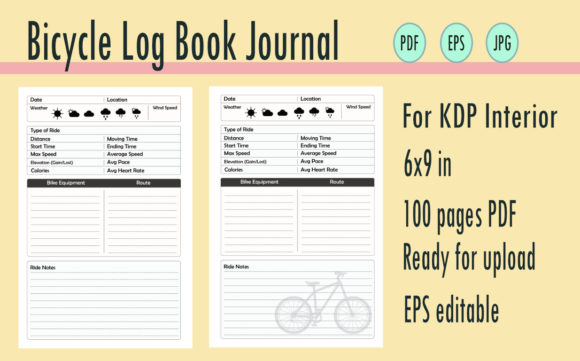
Streamlining Low-Content Publishing with a Bicycle Log Book KDP Journal
For Amazon KDP publishers and digital product creators, the difference between a stagnant portfolio and a profitable niche often lies in workflow efficiency. The Bicycle Log Book KDP Journal represents more than just a cycling tracker; it is a standardized asset designed to integrate seamlessly into a broader low-content publishing strategy. When utilizing a pre-formatted 100-page PDF ready for upload, alongside editable EPS files and JPG covers, creators can bypass the tedious layout phase and focus on market positioning, keyword research, and brand expansion. This resource fits into the production pipeline as a foundational template that ensures technical compliance while allowing for creative differentiation.
Technical Integration and File Management
Understanding the technical specifications of these assets is the first step in a smooth upload process. The 6x9 inch trim size is an industry standard for logbooks, offering a portable form factor that appeals to cyclists who need to carry the journal in a jersey pocket or saddlebag. When incorporating the Bicycle Log Book KDP Journal into your publishing workflow, proper file management prevents common rejection errors or formatting issues during the KDP preview stage.
- PDF Interior Validation: The 100-page PDF ready for upload should be treated as a master file. Before uploading, verify that the bleed settings match your selected trim size. Even if the interior is no-bleed, ensuring margins are consistent across all 100 pages prevents text or table lines from drifting into the gutter binding area.
- EPS Customization Workflow: The included editable EPS files serve as your primary customization layer. Rather than editing the flattened PDF, open the EPS in Adobe Illustrator or compatible vector software to modify table headers, add branding elements, or adjust column widths. This preserves vector quality and ensures crisp printing at any resolution.
- JPG Cover Alignment: Use the provided JPG as a base reference for spine width calculation. Since page count dictates spine thickness, always cross-reference the JPG dimensions with KDP’s cover calculator after finalizing your interior page count. If you add introductory pages or change paper type, the original JPG may require resizing to avoid misalignment.
Integrating these files requires a systematic approach to version control. Maintain separate folders for "Master Assets," "Customized Variants," and "Final Upload Ready" files. This organization prevents accidental uploads of draft versions and streamlines the process when creating future editions or series expansions.
Strategic Customization for Market Differentiation
While the Bicycle Log Book KDP Journal provides a complete structural foundation, successful publishers treat it as a starting point rather than a final product. The editable nature of the EPS files allows for strategic modifications that align the journal with specific sub-niches within the cycling community. This customization phase occurs before the final PDF export and is critical for establishing unique value propositions in a competitive marketplace.
Adapting Content for Specific User Personas
Cycling is not a monolith; different riders track different metrics. Use the editable source files to tailor the logbook structure to distinct audiences. For road cyclists focused on performance, modify the tracking tables to include cadence, heart rate zones, and elevation gain. For gravel bike adventurers, replace speed metrics with terrain notes, gear lists, and waypoint tracking. Commuters might prioritize maintenance logs, expense tracking, and route safety observations over athletic performance data.
This level of adaptation transforms a generic logbook into a specialized tool. By adjusting the column headers and prompt questions in the EPS file, you create a product that speaks directly to a specific user's needs. This specificity improves conversion rates because the customer sees their exact use case reflected in the Look Inside feature and product description.
Branding and Series Development
The EPS files also facilitate brand consistency across multiple products. Insert your publishing imprint logo, website URL, or QR code linking to complementary digital resources directly into the master template. This turns every printed copy into a marketing touchpoint. Furthermore, establishing a consistent visual language using these editable files makes it easier to launch related products, such as a Mountain Bike Maintenance Log or a Triathlon Training Journal, creating a cohesive series that encourages repeat purchases.
Workflow Placement: Pre-Launch to Post-Publication
The utility of this asset extends across the entire product lifecycle. Understanding where the Bicycle Log Book KDP Journal fits relative to other tasks helps optimize time allocation and resource management.
During Keyword Research and Validation: Before customizing the interior, validate that the logbook structure supports high-intent search terms. If your research indicates strong demand for "bicycle repair tracking" but weak demand for "daily ride logs," prioritize modifying the EPS tables to emphasize maintenance sections. The template should adapt to market data, not the other way around.
During Metadata Creation: The structured content of the logbook informs your backend keywords and book description. Because the interior is pre-designed, you can accurately describe features like "dedicated maintenance tracking pages" or "weather-resistant logging tables" with confidence. This alignment between interior reality and external marketing copy reduces return rates and negative reviews stemming from unmet expectations.
Post-Publication Quality Control: After uploading the PDF and JPG, order a physical proof copy. Digital previews cannot fully convey paper opacity, binding tightness, or writing experience. Test the logbook with actual pens and pencils to ensure the paper weight specified in your KDP settings works well with the table density. If ink bleeds through or the gutter is too tight for handwriting, return to the EPS file to adjust spacing or line weights before approving for live distribution.
Operational Efficiency and Scalability
For entrepreneurs and freelancers managing multiple KDP titles, efficiency is paramount. The Bicycle Log Book KDP Journal functions as a scalable asset that reduces per-unit production time. Instead of designing 100 pages of tables from scratch, which can take dozens of hours, you allocate that time to higher-value activities like A+ Content creation, advertising campaign optimization, or audience engagement.
This efficiency compounds over time. Once you have established a customization workflow with the EPS files, producing variations becomes significantly faster. You can create seasonal editions, regional adaptations, or language translations by simply swapping text layers in the vector file and re-exporting the PDF. The JPG cover can be similarly updated using batch processing tools or templates in Photoshop or Canva, maintaining visual consistency while refreshing the listing for new marketing pushes.
Compatibility with other design tools further enhances operational flexibility. While EPS is native to Illustrator, many modern vector editors like Affinity Designer or Inkscape can import and edit these files. This interoperability ensures that your workflow isn't locked to a single software subscription, providing long-term sustainability for your publishing business. Always test file compatibility early in your process to identify any font substitution or layer grouping issues that might affect the final output.
Ensuring Long-Term Usability and Value
A logbook is only useful if cyclists actually complete it. Design decisions made during the EPS customization phase directly impact user retention and completion rates. Consider the practical realities of logging rides: hands might be sweaty, lighting conditions poor, or time limited. Ensure table cells are large enough for quick handwriting, prompts are clear without being verbose, and the layout guides the eye naturally through the logging process.
Incorporate feedback loops into your long-term strategy. Monitor customer reviews specifically mentioning usability aspects like "not enough space for notes" or "tables too small." These insights are direct instructions for your next EPS revision. The ability to update the interior based on real-world usage data transforms the Bicycle Log Book KDP Journal from a static product into an evolving solution that better serves its audience over time.
Finally, consider how this physical journal interacts with digital ecosystems. Many cyclists use apps like Strava or Garmin Connect. Adding a section for syncing digital data, noting app-generated insights, or recording device battery life bridges the gap between analog logging and digital tracking. This hybrid approach acknowledges modern cycling workflows and increases the journal's relevance in a tech-saturated market. By thoughtfully integrating these considerations into your editable template, you create a product that respects both the tradition of paper logging and the realities of contemporary cycling culture.